
Recently, when speaking to an interviewer about my bootcamp experience and the technologies I’ve learned since then, he was a bit surprised I hadn’t begun learning Hooks yet. As a matter of fact, I was too. I started a tutorial last week and though I’m only a couple hours in, I’d like to share what I learned and how wonderfully simple it is to implement Hooks in your React application (at least at a basic level).
First, imagine you’re creating application that displays an emoji you’d like to toggle two different versions of an emoji (such as a like/unlike feature). In my example, I’ll be toggling a caterpillar to a butterfly (because why not?). In a world without Hooks, you’d probably begin by creating a class component, and storing the currently-displayed emoji within state. Then you’d create a standalone onClick function that toggles the two different emojis, likely via ternary and setState.
Although it wouldn’t take that long to code the above example out, any dev who’s watched an app scale (or built their own) and witnessed the jumbled mess that comes out of passing down props through multiple components, bubbling up state, and writing handlers and toggles oh my!, knows how quickly it can get out of control without a library like Redux (or in our case, Hooks).
In my emoji toggler, I’d create a functional component called Toggler.js. That component would look something like this:
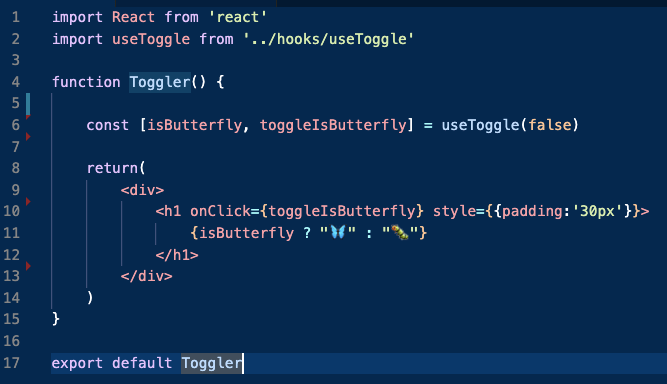
So what about setting state? You can’t set state or use lifecycle methods in a functional components.. so what gives here?
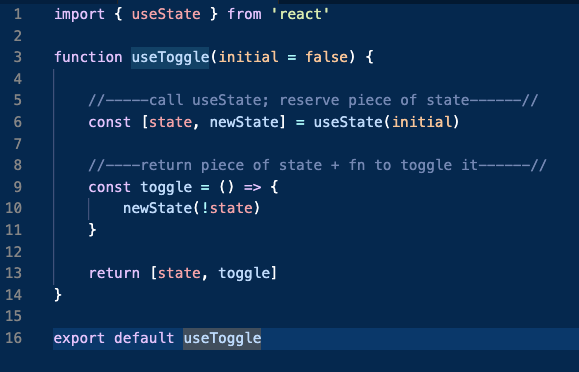
Answer: Hooks allows us to use the above features without classes. In my application, I’ve created a folder separate from my components folder (but within src) called “hooks”. I’ll call the file useToggle.js and import the useState hook. On line 6, I’m initializing a variable called “state” to a value called “initial”. The second argument is actually a function that lets us update the state, so I’ve named it newState. When my caterpillar is clicked, the toggle function is triggered and the Toggler component is re-rendered with a butterfly.
To understand why I created useToggle separately and kept names generic, let me add a few things into my toggler.
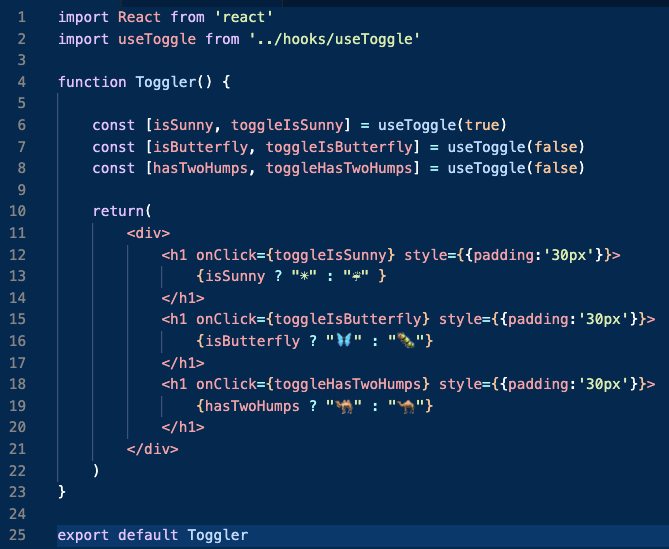
As you can see, all of the onClick functions within the return statement of Toggler are calling a single toggle function within useToggle. I didn’t need to write any extra code in the latter file to be able to toggle any of these emojis back and forth. Pretty cool, huh?
Sources, Tutorials, and recommended reading:
1. https://reactjs.org/docs/hooks-state.html
2. https://www.udemy.com/course/modern-react-bootcamp/learn/lecture/14384888#content
3. https://reactjs.org/docs/hooks-overview.html

