As most React lovers know, creating even the most basic of forms can feel tedious. At minimum, you need 1. a constructor that holds the state of your form inputs; 2. a handleChange function to listen for any changes to that form; and 3. JSX to render all of the above. It’s easy to end up with a lot of repetitive code. Thankfully, React Hooks can do the same thing in a fraction of the lines of code one would typically have to write to achieve a working form. In this post, I’ll go over some fundamentals of forms created with Hooks.
Though the useState hook is super useful for things like this, I’ll be showing you a way to create a custom hook that can be used and re-used to create multiple form inputs within your application.
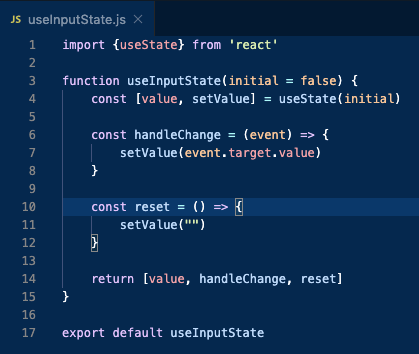
First, you’ll create a new file (I like save these within a subfolder under src called ‘hooks’). I’ll call it useInputState. Import the generic useState via destructuring, define your function, and set an initial value (below, lines 1-3).
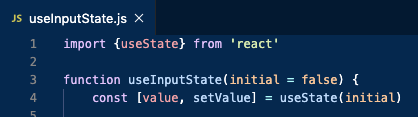
Then, you’ll create a piece of state and a way to manipulate it, passing in the initial value as an argument to useState.

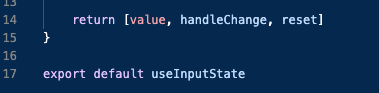
You’ll define a handleChange function that takes the event as an argument, and uses the setValue method (defined above) to set the state to the current form value. This part looks pretty similar to a generic handleChange that you’ve seen whether or not you’ve used hooks.

You’ll use that same method in a reset function, which sets your form value back to an empty string.

Lastly, you’ll return all of your methods in the form of an array (or object, if that’s better for your use case).
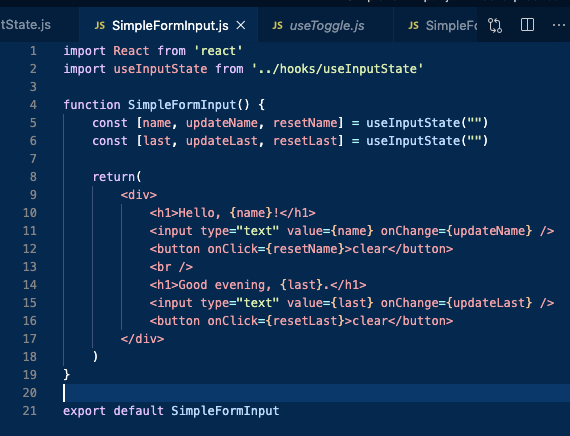
Now, you can create another file (I like to keep this type in a components subfolder). Import React as per usual as well as the useInputState hook you just created.

Within your functional component, you can define a few fields that correspond to a piece of state, the update/set method, and a reset method. These will utilize your custom hook with an empty string passed in for the initial value.

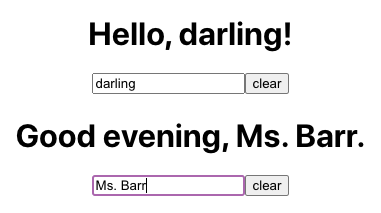
Now, all you need to do is write your custom JSX. The form I created for the purposes of this post is very simple and doesn’t actually submit to a backend, but the point here is simply to demonstrate the ease of creating forms with hooks.
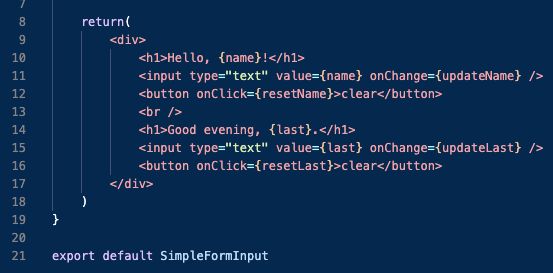
Lastly, for ease of reference, here is the full code we’ve just written and the resulting form. Hope this helps!
Sources + Further Reading:
1. https://www.udemy.com/course/modern-react-bootcamp/ (seriously recommended!)
2. https://upmostly.com/tutorials/using-custom-react-hooks-simplify-forms
3. https://reactjs.org/docs/hooks-custom.html#gatsby-focus-wrapper
4. https://reactjs.org/docs/hooks-faq.html#gatsby-focus-wrapper

